PartialSync behaviour
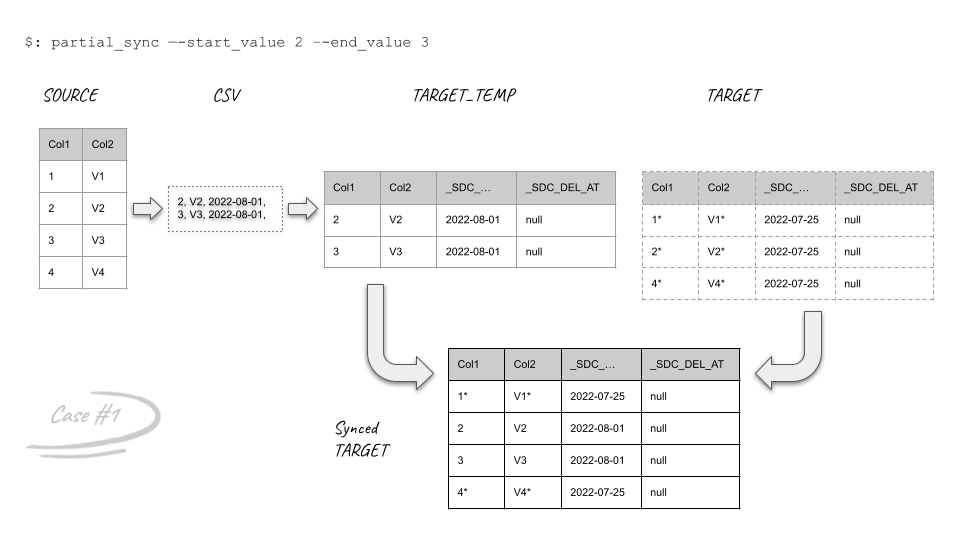
PartialSync exports a bounded source range, loads a temporary target table, and merges that range into the existing target. It is available from MariaDB/MySQL or PostgreSQL to Snowflake.
Changed non-key decimal definitions use column versioning before the merge. Historical versions remain available, and untouched rows have NULL in the new column. Decimal primary-key changes and lossy decimal range mappings require FullSync. See Decimal mapping.
A table configured with sync_start_from also uses PartialSync during
fast_sync, including fast_sync --force. The flag bypasses the FullSync
size limit; it does not override the configured range or request a full-table
reload. An unfiltered whole-tap PostgreSQL fast_sync still resets its
LOG_BASED source slot before workers start; standalone partial_sync_table
retains it. See PostgreSQL source-slot reset.
Range semantics
The start boundary is inclusive. An explicit end boundary is also inclusive. Choose a stable, comparable column and a range that can be verified independently. Source filtering precedes the source-side Load-time transformations, so masking a column never changes which source rows enter the export. Keep the boundary column untransformed: the target range predicate still uses the original boundary values.
pipelinewise partial_sync_table \
  --tap <tap_id> \
  --target snowflake \
  --table <schema.table> \
  --column <column> \
  --start_value <start> \
  --end_value <end>
Without an end value, PipelineWise captures a replication position at the start and can hand ongoing replication over from that position after the merge.
Native-table merge outcomes
Condition |
Rows inside the range |
Rows outside the range |
|---|---|---|
Matching schemas |
Existing rows update; new rows insert. |
Unchanged. |
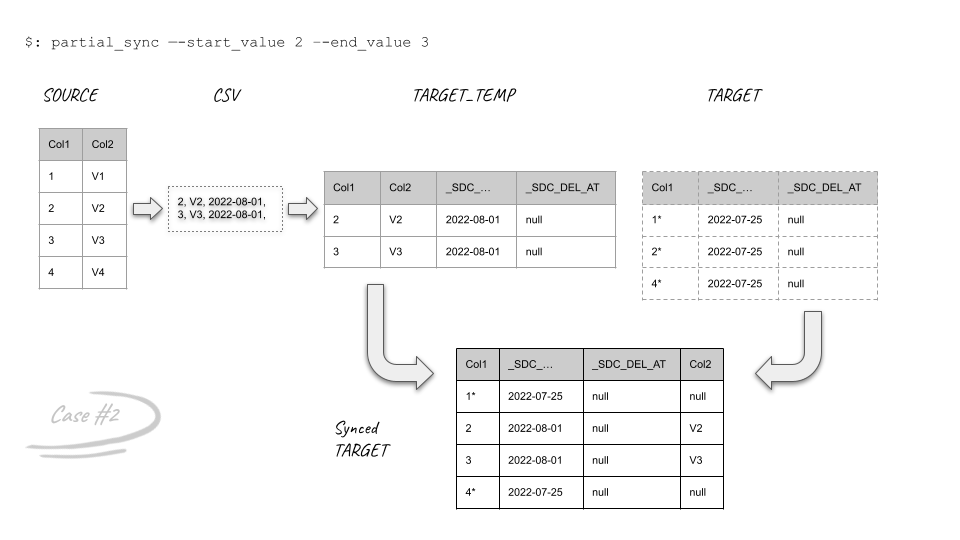
Column absent from target |
The target column is created and receives source values. |
Existing rows have no backfilled value. |
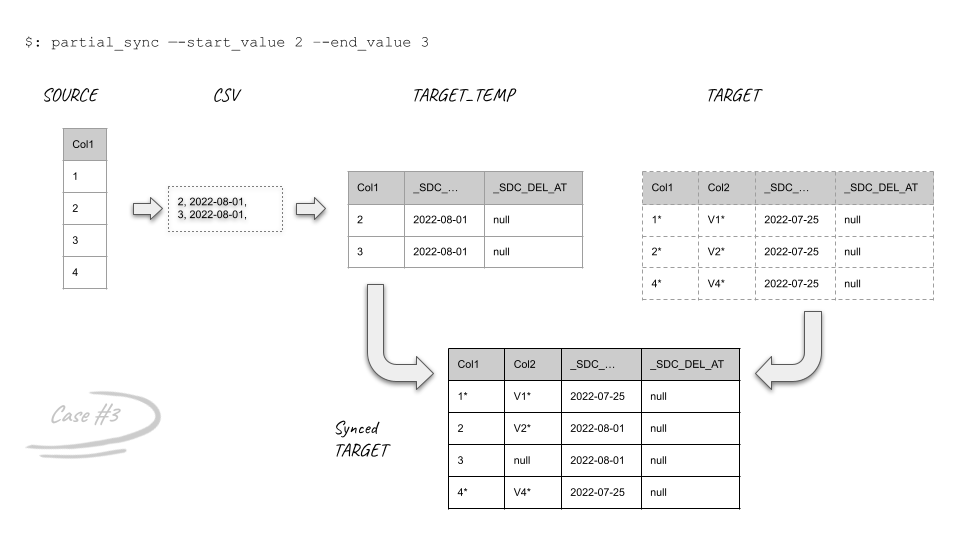
Column absent from source |
Merged target values become |
Existing values remain unchanged. |
Compatible text column is narrower than |
PipelineWise widens the target column before applying the merge. |
Values are unchanged; the wider column definition applies to the table. |
MariaDB/MySQL |
Existing rows update; new rows insert. The target column keeps its width. |
Unchanged. |
Non-key decimal changes type, precision, or scale; it is not the range column |
The old column is versioned; the new numeric column receives source values. |
Old values remain in the versioned column; the new column is |
Other incompatible type, width, or precision |
PartialSync fails before export; no merge or state advancement. |
Unchanged. |
Target row absent from the source range |
Deleted. |
Unchanged. |
Row marking, merging, and deletion run in one transaction. The internal
_SDC_DELETED_AT marker remains available for subsequent loads, but missing
source rows are always physically deleted from the selected target range.
Snowflake commits schema changes independently from the merge transaction.
PipelineWise therefore widens compatible native text columns and adds missing
columns before starting DML. It checks all overlapping column types before
export and again before the merge, even when no transformations are configured.
Numeric precision and scale, binary width, and temporal precision must hold the
mapped values; timestamp timezone types must match. A MariaDB/MySQL BINARY
or VARBINARY source column only needs a target width that holds its declared
length. For example, a BINARY(16) key merges into an existing
BINARY(8388608) column. Missing catalog dimensions
fail validation rather than being guessed. Compatible text widening and
decimal column versioning are automatic. Versioning
is unavailable for primary keys or the PartialSync range column.
Only source decimal columns qualify for numeric versioning; a mismatched
floating-point or integer source column remains incompatible.
This can reject previously tolerated numeric, binary, or temporal differences
between Singer and FastSync. The existing text-type check also rejects native
PostgreSQL hstore stored as Singer VARIANT where FastSync maps it to
VARCHAR. Use FullSync to recreate an incompatible target with its mapped
types. A FullSync must cover the whole table: sync_start_from still
selects PartialSync. If only a text-column widening lacks privileges, have an
authorized role widen it to VARCHAR(134217728) and retry.
Native compatibility report
Before deploying stricter type checks, run this report for each imported native Snowflake tap, using the installed PipelineWise Python environment:
python -m pipelinewise.fastsync.partialsync.compatibility_report \
  --tap-type tap-postgres \
  --tap-dir ~/.pipelinewise/<target_id>/<tap_id> \
  --target ~/.pipelinewise/<target_id>/config.json
Use --tap-type tap-mysql for MySQL/MariaDB. By default, the report checks
selected tables configured with sync_start_from. It marks
drop_target_table: true tables as skipped because replacement does not reuse
their existing column types. Add
--tables public.orders,public.customers to check other selected tables used
by explicit PartialSync commands, or to check merge compatibility for a table
normally configured for replacement.
The report reads source and Snowflake metadata only. It does not export rows, run custom session SQL, alter columns, or change replication state/recovery. It uses FastSync’s native source configuration, metadata query, and type mapping. JSON output lists all incompatible columns, compatible columns, columns that would widen, decimal columns that would be versioned, and columns that would be added. Missing targets and unsupported routes or Iceberg tables are reported separately.
Exit status is 1 for incompatibilities or report errors, 2 for invalid input, and 0 otherwise. Inspect skipped entries: exit 0 is not proof that every table was checked. This is a metadata snapshot, not a check of transformations, publication privileges, target primary-key constraints, or pending recovery. It uses imported source key metadata to reject decimal key changes. Resolve incompatible types before deployment; runtime validation remains enabled.
Errors identify the failed operation and exception type, with database error codes and a Snowflake query ID when available. Unexpected code errors also write sanitized code locations to stderr. Neither output includes raw exception messages, credentials, or source values; use the codes or query ID to investigate.
Managed Iceberg v3 outcomes
MariaDB/MySQL and PostgreSQL taps can select managed Iceberg v3 through
target_table_format: iceberg. This route requires a primary key and
data_flattening_max_level: 0.
Target state |
Outcome |
|---|---|
Missing |
Creates a managed Iceberg v3 table containing the selected range. |
Exactly compatible |
Updates, inserts, and deletes missing source rows in one range transaction. |
New nullable source column |
Adds the column, then applies the range transaction. |
Non-key decimal changes type, precision, or scale; it is not the range column |
Versions the old column and adds the numeric column before the range transaction. |
Other schema or primary-key mismatch |
Fails before DML. |
Existing string column is not |
Fails before DML; PipelineWise does not widen existing Iceberg columns. |
NULL or duplicate transformed staging key |
Fails before new publication DML; an already-submitted recovery remains ambiguous and preserves its evidence. |
|
Replaces the table with only the selected range. |
PipelineWise persists the resolved range before export. An interrupted retry reuses and deterministically replays that range after an ambiguous commit; it does not resolve a dynamic boundary again. State changes only after publication and finalization succeed. See Concurrency and recovery.
After loading the source-transformed CSV, PipelineWise checks the canonical primary-key projection for NULL components and duplicate composite-key groups before it starts the range transaction. It does not choose or deduplicate conflicting rows. An invalid staged attempt is kept for cleanup and re-export; if an attempt was already submitted, its outcome remains ambiguous and requires manual recovery because the transaction may have committed.
Visual examples
Normal merge:
Target missing a source column:
Source missing a target column:
Safety and validation
Stop overlapping writes or replication when the selected range can change during export and merge.
Estimate the source range and target merge cost before running.
Confirm the boundary query selects the intended range. A dynamic boundary query returning no value skips publication; a resolved range with no source rows can delete all target rows in that range.
Ensure transformations and canonical casts preserve non-NULL, unique composite primary keys; PipelineWise rejects rather than deduplicates an invalid staging result.
After completion, compare exact primary keys and critical values inside the range, then confirm the next normal Singer run advances state.
On managed-Iceberg failure, retain staging objects, the
iceberg-recovery-<hash>.jsonstream manifest, theiceberg-fastsync-target-<hash>.jsontarget pointer, and state until target publication is understood. Do not mark the range repaired from row count alone.